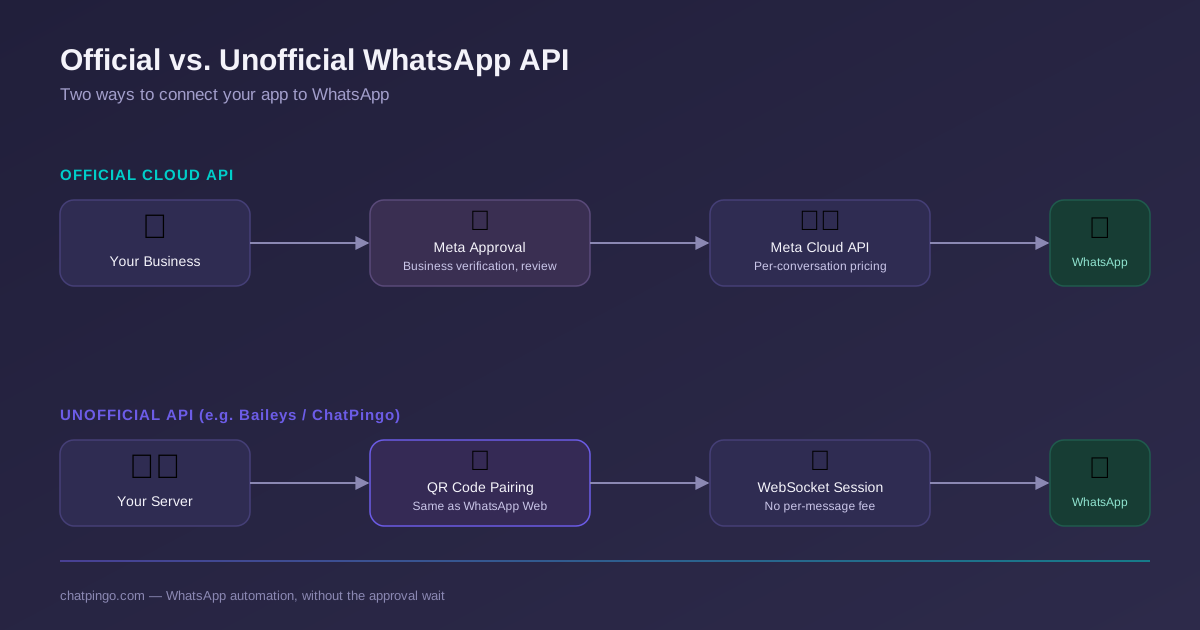
Meta's official WhatsApp Business Cloud API is powerful, but it comes with a business verification process, template approval queues, and per-conversation billing that can take days to clear before you send a single message. That gap is exactly why a whole category of "unofficial" WhatsApp APIs exists — tools that connect to WhatsApp the same way WhatsApp Web does, without waiting on Meta at all.
Why Developers Use Unofficial WhatsApp APIs
For a developer prototyping an idea, or a startup that needs messaging live this week instead of next month, the official approval pipeline is friction they can't afford. Unofficial APIs — built on libraries like Baileys, which speak WhatsApp Web's own WebSocket protocol — remove that friction entirely.
- No Meta business verification or template review queue to wait on
- No per-conversation fee — you run your own infrastructure
- Full control over message formats, automation logic, and data storage
- Fast to prototype: scan a QR code and you have a working session in seconds
How an Unofficial WhatsApp API Works
WhatsApp Web works by pairing your phone with a browser session over a WebSocket connection — you scan a QR code, and from then on messages flow through that encrypted socket instead of your phone's native app connection. Unofficial APIs replicate exactly that protocol in server-side code instead of a browser, so "WhatsApp Web" runs headlessly on your own infrastructure, 24/7.
Common Use Cases
- Customer support automation and shared team inboxes
- Marketing campaigns and broadcast messaging to opted-in contacts
- Order confirmations, shipping updates, and appointment reminders
- CRM and helpdesk integrations that need WhatsApp as a channel
- AI-powered auto-replies for common questions, 24/7
Official vs Unofficial WhatsApp API
| Aspect | Official Cloud API | Unofficial API |
|---|---|---|
| Approval time | Days to weeks | Minutes — scan a QR code |
| Pricing model | Per conversation, billed by Meta | Your own infrastructure cost only |
| Setup complexity | Business verification + templates | Connect a session, start sending |
| Best for | Large enterprises, regulated flows | Startups, SaaS tools, fast iteration |
Risks of Using an Unofficial WhatsApp API
None of this is a free lunch. Unofficial APIs rely on a reverse-engineered protocol, not a published contract, so they carry real risks that are worth going in with eyes open.
- A number can be banned if it's used to send unsolicited bulk messages
- No official SLA or support line from Meta if something breaks
- Protocol changes on WhatsApp's side can require a client library update
- Using it outside WhatsApp's Terms of Service is a genuine compliance risk, not just a technicality
Best Practices for Using WhatsApp APIs
Most bans trace back to a small set of avoidable habits. Following these keeps a number healthy indefinitely:
- Send messages only to users who have opted in
- Avoid sending mass spam campaigns
- Provide real value in your communication
- Use automation responsibly
- Monitor message delivery and engagement
Hi! Do you still ship to Dubai?
Can Businesses Use Unofficial WhatsApp APIs?
Yes. Many startups and SaaS platforms use them to build messaging automation tools, customer support systems, and CRM integrations — the pattern above (opt-in, real value, responsible automation) is exactly what keeps that usage sustainable at scale.
How to Sell This on Your Platform — Become a Partner
If you're building on top of this stack for your own clients — an agency, a SaaS platform, or a systems integrator — you don't have to build the WhatsApp layer from scratch. ChatPingo's Partner Program lets you resell this infrastructure under your own brand: your pricing, your dashboard, our sessions and delivery engine underneath.
Ready to offer WhatsApp automation to your own customers without building the infrastructure yourself?
Become a Partner